How to Connect Two Buildings With a Wireless Bridge | John’s Antennas
Extend internet from your home, office, or Starlink connection to a shop, barn, guest house, camera system, or second building without burying Ethernet between them.
If you already have good internet service at one building, you may not need to purchase a second internet connection for another building on the same property.
A properly designed point-to-point wireless bridge can carry the network connection from one building to another through the air.
At John’s Antennas, we use wireless bridge systems for homes, farms, workshops, offices, outbuildings, security cameras, and rural properties where running underground cable would be difficult, expensive, or impractical.
The basic idea is simple:
Internet source → Building A radio → wireless link → Building B radio → network switch or Wi-Fi access point
But making that link reliable requires more than simply pointing two radios at each other.
What Is a Wireless Bridge?
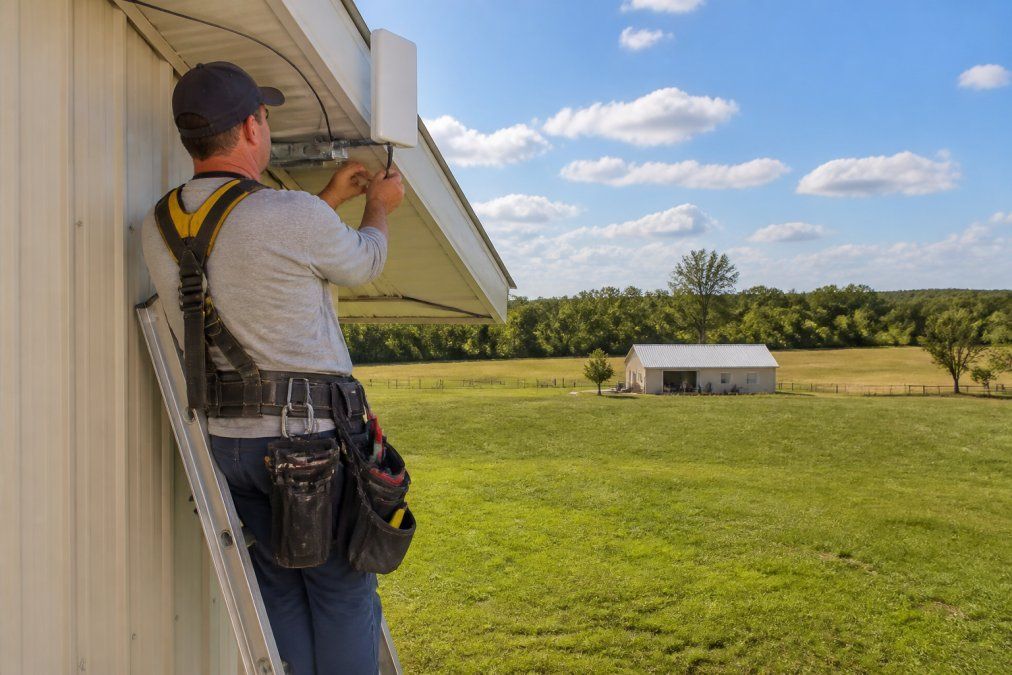
A wireless bridge uses two directional outdoor radios to create a dedicated network connection between two locations.
Install one radio at the building that already has internet service. The second radio is installed at the building where you want to extend that connection.
The radios communicate directly.
Once the connection reaches the second building, it can feed:
- A Wi-Fi access point
- Computers
- Smart TVs
- Security cameras
- Network switches
- Point-of-sale equipment
- VoIP phones
- Other Ethernet-connected devices
The internet source at the first building might be cable, fiber, DSL, fixed wireless, or Starlink.
The bridge does not care where the internet comes from. Its job is simply to move that network connection from one building to another.
You May Not Need a Second Internet Service
This is one of the first things we explain to customers.
If your home already has a good internet connection and you have a detached shop, barn, garage, office, or guest house nearby, you may not need another monthly internet service.
A wireless bridge can often extend the connection you already pay for.
For rural properties in particular, that can be an attractive solution because a second internet connection may be expensive—or may not even be available.
Line of Sight Is Only the Beginning
A good wireless bridge needs a clear path between the two radios.
If you stand at Building A and can clearly see Building B, that is a good start.
But visual line of sight does not tell the whole story.
Radio signals also occupy an area around the direct path called the Fresnel zone.
Think of it as a football-shaped area surrounding the imaginary straight line between the two antennas.
Trees, rooftops, hills, vehicles, equipment, and other obstacles can intrude into that area and reduce link quality even when you can still physically see the other building.
That can result in:
- Lower speeds
- Higher latency
- Packet loss
- Unstable connections
- Intermittent dropouts
- Poor video or VoIP performance
This is why mounting height matters.
The goal is not simply to mount the radio as high as possible.
The goal is to mount both radios high enough to provide good line of sight and adequate Fresnel-zone clearance.
Trees Can Be a Bigger Problem Than Distance
Customers are often surprised by this.
A relatively long wireless bridge across a clear open field can work extremely well.
A much shorter link through several large oak trees may not.
Leaves contain water, and foliage can absorb and scatter radio-frequency energy.
A path that works reasonably well in winter may change when trees fill out in spring and summer.
Florida vegetation grows quickly, so we consider not only what the path looks like today but also what may happen as trees and limbs continue growing.
Choosing Between 2.4 GHz, 5 GHz, and 60 GHz
Different wireless bridge systems use different radio frequencies.
2.4 GHz
The 2.4 GHz band can sometimes perform better around limited foliage and other obstructions than higher frequencies.
However, Wi-Fi, cameras, smart-home devices, and other equipment also use it heavily, so interference can be a problem.
5 GHz
For many of the point-to-point systems we install, 5 GHz provides an excellent balance of performance, available spectrum, and equipment choices.
With good line of sight and proper alignment, a 5 GHz bridge can provide a fast and dependable connection over substantial distances.
60 GHz
60 GHz systems can provide very high throughput, but they require clear paths and are generally best for shorter links.
They also experience more atmospheric and rain attenuation than lower-frequency systems.
There is no single frequency that is automatically best.
The right choice depends on distance, interference, line of sight, required speed, and the equipment being connected.
How a Point-to-Point Wireless Bridge Is Installed
A professional bridge installation normally begins with the property, not the equipment.
1. Survey the Path
Before selecting radios, determine exactly where the two buildings are and whether a usable radio path exists between them.
We look for:
- Trees
- Terrain
- Rooflines
- Metal buildings
- Future construction
- Vehicles or equipment that may regularly block the path
- Suitable mounting locations
Sometimes moving the radio only a few feet can substantially improve the path.
2. Select the Appropriate Radios
The radio system should be selected for the distance, environment, throughput requirements, and mounting conditions.
Directional radios concentrate their energy toward the opposite building instead of broadcasting equally in every direction.
That is one reason point-to-point equipment can provide a much more reliable building-to-building connection than trying to stretch ordinary household Wi-Fi across the property.
3. Mount the Radios
Mount each radio securely on a building, mast, pole, or tower.
The two units need to face each other accurately.
A small aiming error may not matter on a short link, but alignment becomes more important as distance increases and antenna beamwidth narrows.
4. Run Outdoor Network Cable
Most outdoor bridge radios receive both data and electrical power through Ethernet using
Power over Ethernet, or PoE.
That means the radio usually doesn't need an electrical outlet.
The Ethernet cable runs from inside the building to the outdoor radio.
Outdoor installations should use appropriate exterior-rated cable, weather-resistant connections, proper cable routing, drip loops, and sealed building penetrations.
5. Configure the Radios
Terminology varies by manufacturer, but generally one radio serves as the transmitting (Access Point) side of the point-to-point link, while the second operates as the receiving (Station) side.
Together, they bridge the two wired networks.
We also configure management IP addresses so the radios can be monitored and serviced later.
6. Aim and Optimize the Link
Once the radios communicate, we fine-tune their alignment.
We look at more than whether the radios simply say “connected.”
Depending on the equipment, useful information may include:
- Signal strength
- Noise level
- Signal-to-noise ratio
- Link capacity
- Data rates
- Retries or errors
- Latency
- Throughput
The strongest signal is not always the only goal. We want a stable, clean link with useful throughput.
7. Connect the Second Building
Once the bridge reaches Building B, the connection can be distributed based on the customer's needs.
For example:
Bridge radio → Ethernet switch → computers and cameras
or:
Bridge radio → Wi-Fi access point → wireless devices
The receiving building does not automatically need a second router performing another layer of routing.
In many installations, a switch and Wi-Fi access point are all that is required.
A Wireless Bridge Is Not the Same as a Wi-Fi Extender
This distinction often causes confusion.
A Wi-Fi extender repeats an existing wireless signal to nearby devices.
A wireless bridge creates a dedicated link between two fixed locations.
For connecting separate buildings, a properly installed directional bridge is usually a much better solution than trying to make an indoor Wi-Fi extender reach across the yard.
The bridge gets the internet to the second building.
A Wi-Fi access point inside that building then provides the local Wi-Fi coverage.
Those are two different jobs.
Channel Selection and Interference Matter
Even with perfect line of sight, interference can hurt performance.
Nearby Wi-Fi networks, wireless cameras, other bridge links, and radio equipment may already be using part of the available spectrum.
That is why we like to examine the RF environment rather than simply selecting a channel and hoping for the best.
A link can show a strong signal and still perform poorly if the channel is congested.
Changing frequency or channel width can sometimes improve performance substantially without changing the radios themselves.
Lightning and Surge Protection Should Not Be an Afterthought
Outdoor wireless equipment is exposed equipment.
The radios may be mounted high on a building, mast, pole, or tower, and Ethernet cable can provide a path toward expensive network equipment inside the building.
For that reason, wireless bridge design should also consider:
- Surge protection
- Proper outdoor cable
- Cable routing
- Weather sealing
- Grounding and bonding practices appropriate to the installation
- Protection of indoor networking equipment
A nearby lightning event can damage outdoor radios and network equipment even without a direct strike.
No protection method can guarantee that electronic equipment will survive every lightning event, but proper system design can reduce unnecessary exposure.
Troubleshooting a Wireless Bridge
When a bridge begins performing poorly, replacing the radios shouldn't be the first step.
We normally look for changes in the system or environment.
Common problems include:
Trees or New Obstructions
Vegetation may have grown into the signal path, or a new building, trailer, sign, or other obstruction may have appeared.
Radio Alignment
Wind, storms, loose mounting hardware, or nearby work can change alignment.
Cable or Connector Problems
Outdoor Ethernet cable and connectors can deteriorate or suffer moisture intrusion.
Interference
A channel that was clear when the system was installed may now be crowded.
Power Problems
PoE injectors, switches, power supplies, and surge devices can fail.
Network Congestion
The wireless bridge may be working properly while the internet connection or local network becomes overloaded.
Latency, Jitter, or Packet Loss
If video calls or VoIP conversations break up, bandwidth alone may not be the problem.
High latency, jitter, packet loss, interference, or an unstable radio link can all affect real-time applications.
Wireless Bridges for Starlink Properties
Point-to-point wireless bridges can be particularly useful with Starlink.
A rural property may have one location with the best clear view of the sky for the Starlink dish, while the house, office, barn, shop, or other building that needs internet is somewhere else.
Instead of compromising the Starlink installation location, a wireless bridge can distribute that internet connection across the property.
For larger properties, one Starlink connection may also feed multiple areas using a combination of point-to-point links, network switches, and Wi-Fi access points.
This is where planning becomes important.
The goal is not simply to make the internet “reach.”
The goal is to build a network that remains dependable after everything is connected.
When Professional Installation Makes Sense
Many short wireless bridges are straightforward.
Others are not.
Professional installation becomes particularly useful when:
- Trees interfere with the path
- One or both radios require substantial height
- A tower or mast is needed
- The buildings are far apart
- Several buildings need connections
- Security cameras are involved
- The system will support business operations
- Multiple switches or Wi-Fi access points are required
- VLANs or network separation are needed
- Starlink is being distributed around a large property
- Outdoor cable and surge protection need to be designed correctly
John’s Antennas has worked with rural communications systems for decades, and wireless networking has become another important part of connecting properties that conventional wiring cannot easily reach.
If You Already Have Internet at One Building, Start There
Before ordering another internet service for your shop, barn, office, garage, or guest house, take a look at the property.
If the buildings have a usable wireless path between them, you may be able to extend your existing internet service.
Call John’s Antennas and let us review the property with you.
We can discuss the distance, line of sight, mounting locations, equipment requirements, and what you want to accomplish at the second building.
Sometimes the solution is a simple two-radio bridge.
Other times it may involve Starlink, multiple buildings, Wi-Fi access points, cameras, or a larger network distribution system.
The important part is designing the system for the property before buying the equipment.
Frequently Asked Questions
How far can a wireless bridge reach between two buildings?
Distance depends on the radios, frequency, antenna design, interference, mounting height, and the radio path. Properly designed directional systems can operate over substantial distances, but a clear path and adequate Fresnel-zone clearance are often more important than the mileage number advertised for the equipment.
Do the two buildings need a clear line of sight?
For dependable point-to-point wireless service, clear line of sight is highly desirable. The radio path also needs adequate clearance around it for the Fresnel zone. Trees, terrain, roofs, and other objects can interfere with the signal even when the opposite building is still visible.
Can trees block a wireless bridge?
Yes. Heavy foliage can absorb and scatter radio-frequency signals. A short link through trees can sometimes perform worse than a much longer link across open ground.
Is 2.4 GHz or 5 GHz better for a wireless bridge?
Neither is automatically better. 2.4 GHz can sometimes tolerate limited obstructions somewhat better but is often more congested. 5 GHz offers more channel choices and is widely used for point-to-point links with clear line of sight. The correct band depends on the property and application.
Do I need a router in the second building?
Not necessarily. In many systems, the bridge radio at the second building connects to an Ethernet switch and/or Wi-Fi access point. Whether you need another router depends on how the network is designed.
Can I extend Starlink to another building?
Yes. A point-to-point wireless bridge can be an excellent way to distribute a Starlink connection to another building, especially on rural properties where the best location for the Starlink dish isn't the same as where you need Wi-Fi or wired internet.
Is a wireless bridge better than a Wi-Fi extender?
For connecting two separate buildings, usually yes. A wireless bridge creates a dedicated directional link between fixed locations. A Wi-Fi extender is intended primarily to repeat wireless coverage to nearby devices.
Can a wireless bridge support security cameras?
Yes. Wireless bridges are commonly used to carry network traffic for security cameras, provided the bridge has adequate capacity and the network is designed properly.
Can John’s Antennas connect more than two buildings?
Yes. Depending on the property, you can use multiple wireless links to distribute internet and network service to several buildings. Larger systems may also include switches, Wi-Fi access points, cameras, VLANs, and Starlink distribution.